3 Ways SimpleURL Link Analytics Delivers Marketing Intelligence

When you use short links, smaller URLs are only half the benefit. Smart links matter more. Basic tools only count clicks. SimpleURL's link analytics dashboard gives you rich audience data to guide every marketing choice.
Here are 3 key data points from your SimpleURL dashboard to help you stop guessing and start growing.
1. Identify High-Value Audiences with Geographic Data
Your SimpleURL dashboard shows where clicks come from, down to the city level. This map highlights your strongest organic reach.
The Actionable Takeaway: Optimize Resource Allocation
When click volume spikes in a new area, you have found an untapped market.
-
Improve Ad Targeting: Shift marketing spend toward cities with strong organic traction to get more value from your budget.
-
Localize Content: If clicks spike in countries like Germany or Japan, translate key landing pages to lift conversion rates.
-
Plan Better Events: Use city-level click density to pick the best venues and host cities for field events.
See this in action in our case study on city-level analytics finding a new market, where a software startup identified customer demand in Tier-2 hubs before spending on local ads.
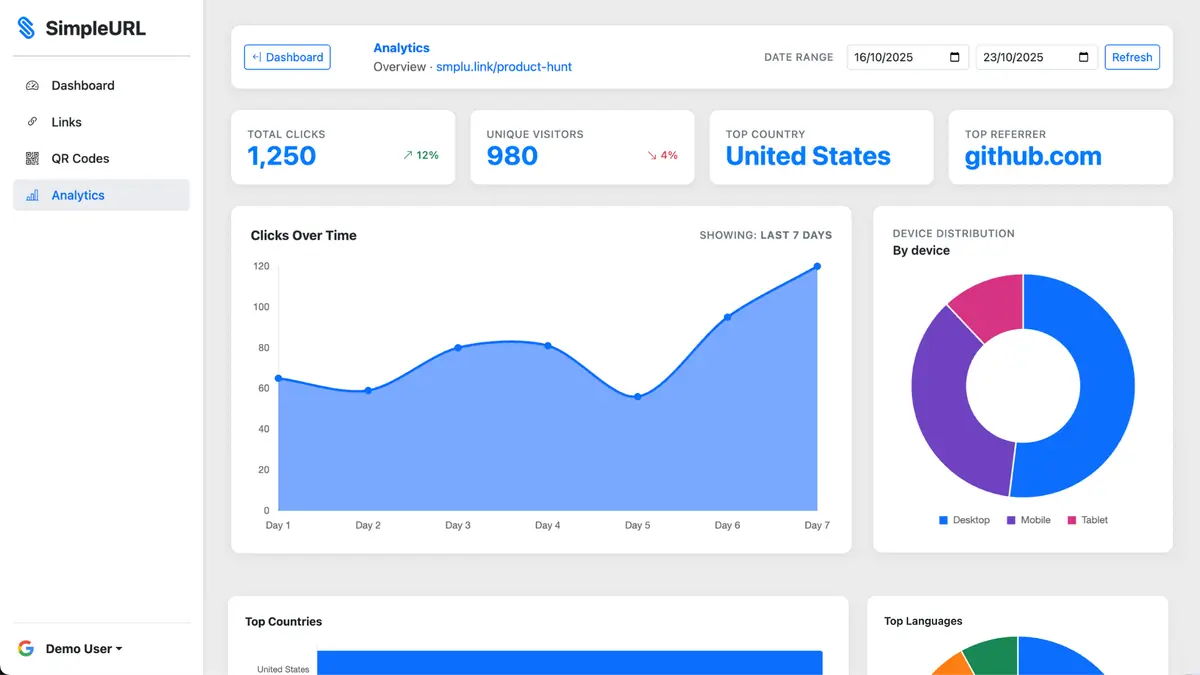
2. Refine User Experience with Device and OS Breakdown
High clicks with low signups often point to device bugs. SimpleURL breaks down traffic by device type (Desktop, Mobile, Tablet) and operating system (iOS, Android, Windows, etc.).
The Actionable Takeaway: Eliminate Conversion Friction
Clicks mean little if visitors bounce before converting. Device data helps you spot and fix user hurdles quickly.
-
Audit Mobile Pages: If mobile brings most of your clicks, test your mobile page speed, form layouts, and tap targets first.
-
Debug Device Bugs: If Android users bounce while iOS users convert, test on Android to find broken scripts or styles.
-
Match the Format: When mobile traffic leads, swap long PDFs for bite-sized guides and scannable cards.
3. Find Peak Engagement Times for Maximum Reach
Post when your audience is awake and scrolling. SimpleURL’s real-time reporting shows click activity by hour in real time.
The Actionable Takeaway: Perfect Your Content Calendar
Sharing a post at the wrong hour buries it under competitors' updates.
-
Set Your Schedule: If click volume peaks between 11 AM and 1 PM on weekdays, drop your biggest launches during that peak.
-
A/B Test Hours: Compare two short links sent in morning and afternoon blasts to see which time drives more clicks.
-
Build Predictable Reach: Plan future drops around verified peak hours to lift organic views at zero extra cost. Combine time-stamped links with our UTM builder to compare morning vs. evening channel performance.
Take the Next Step in Data-Driven Marketing
Branded short links build trust. The click data behind them powers growth.
Move past simple click totals. With clear city, device, and timing data in SimpleURL, you can make sharp decisions that boost signups and stretch your ad dollars further.
Read our complete deep dive on short link tracking to build weekly reporting rhythms.
Start turning your click counts into strategic market insights today.