What is a URL Shortener and How Does It Work? (Beginner's Guide)

As Digital Marketing professional you know that Long URLs are messy, unprofessional, and hard to share. They break in emails, look spammy on social media, and are impossible to remember.
URL shorteners solve this problem by turning lengthy web addresses into clean, clickable links that are easier to share, track, and manage.
What is a URL Shortener?
A URL shortener is a tool that takes a long web address and converts it into a shorter, easier-to-share link.
When someone clicks your short link, they are instantly redirected to the original long URL. The destination stays the same, but the link becomes much cleaner and more manageable.
its help you to build trust on your brand and you get good click in your every marketing campaign.
Real Examples
Long URL:
https://www.example.com/blog/2025/complete-guide-to-digital-marketing-strategies-for-small-businesses?utm_source=facebook&utm_medium=social
Short URL:
smplu.link/marketing
The difference is obvious. One looks cluttered and confusing. The other is clean, professional, and easy to share.
Why People Use URL Shorteners
Easier to Share Across Platforms
-
Long URLs look messy and unprofessional, especially on social media platforms like Twitter, Instagram, and LinkedIn.
-
Short links make your content look cleaner and more organized. They fit better in bios, tweets, and captions without breaking or wrapping awkwardly.
Better Click-Through Rates
-
Short, clean links get more clicks than long, complicated URLs.
-
Users are more likely to click a link that looks legitimate and trustworthy. Long URLs with random characters can appear spammy or suspicious, causing people to hesitate.
Track Link Performance
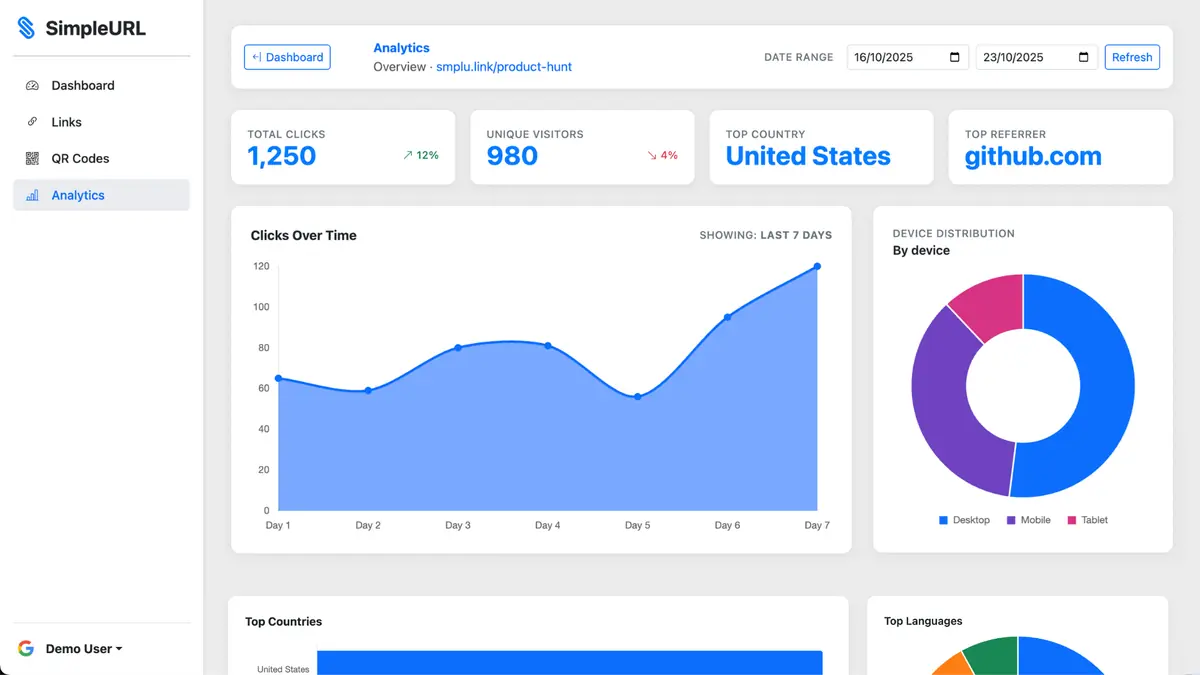
Most URL shorteners include built-in analytics that show you:
-
How many people clicked your link
-
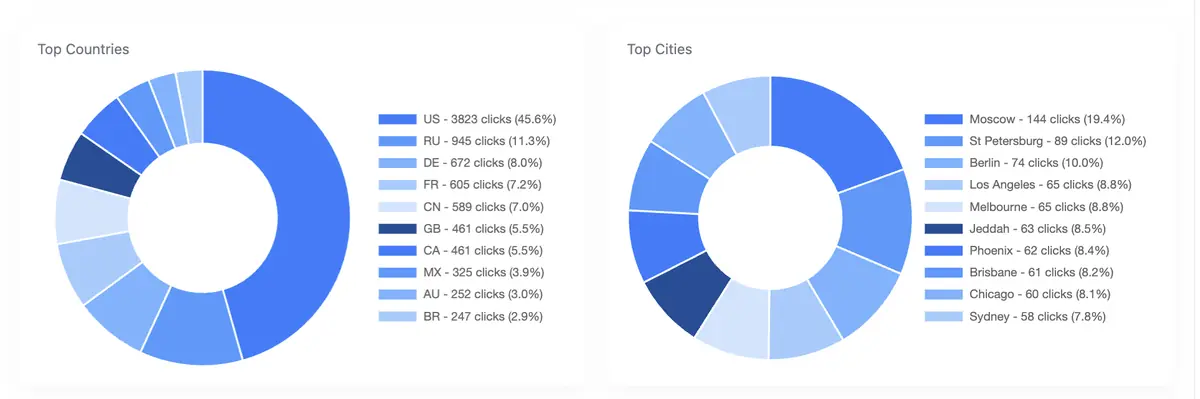
Where your clicks came from geographically
-
Which devices people used (mobile, desktop, tablet)
-
What times and days get the most engagement
-
Which marketing channels perform best
This data helps you understand what content resonates with your audience and which campaigns drive results.
Professional Appearance
Short links look polished and intentional.
Compare these two options in an email signature or business card:
-
Long:
https://www.yourcompany.com/services/consultation-booking-page-schedule-meeting -
Short:
yourco.link/book
The short version is memorable, professional, and easy to type.
Save Character Space
-
Platforms like Twitter have character limits. Every character counts.
-
Short links free up valuable space for your actual message, hashtags, and calls to action.
Edit Links After Sharing
-
Many URL shorteners like SimpleURL URL Shortner let you update where a short link points without changing the short URL itself.
-
This means if you need to change a landing page or fix a broken link, you can do it without reprinting materials or resending emails.
How URL Shorteners Work: Behind the Scenes
Understanding how URL shorteners work helps you use them more effectively. The process is simpler than you might think.
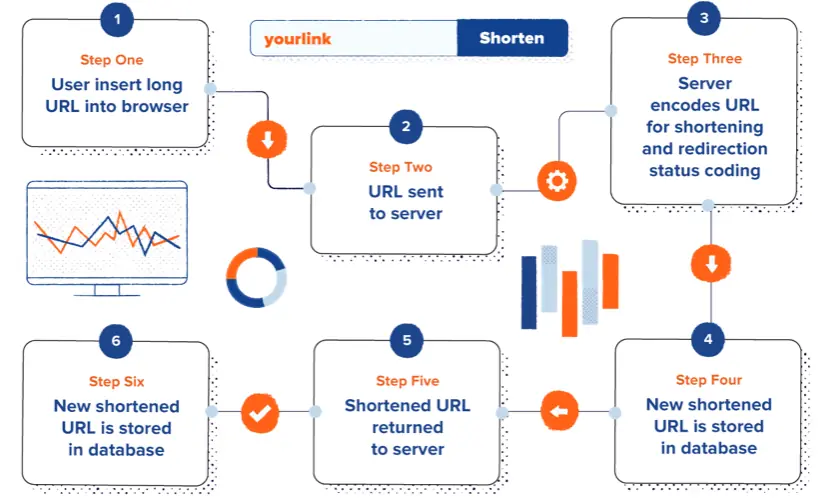
Step 1: You Submit a Long URL
You paste your long web address into the URL shortener tool, either through a website, browser extension, or mobile app.
Step 2: The System Generates a Unique Code
-
The shortener creates a unique identifier, usually a combination of letters and numbers.
-
This code becomes the short part of your URL. For example:
abc123orx7pQ2m. -
The code is unique, meaning no two different long URLs will get the same short code.
Step 3: Mapping Gets Stored in a Database
The system stores the relationship between your long URL and the short code in a database.
This mapping is how the system knows where to send visitors when they click your short link.
Step 4: You Get Your Short Link
The tool provides you with the complete shortened URL, ready to share.
For example: smplu.link/abc123
Step 5: Redirect Happens When Someone Clicks
When anyone clicks your short link:
-
Their browser sends a request to the shortener's server
-
The server looks up the short code in the database
-
It finds the matching long URL
-
It redirects the visitor to the original destination
This entire process takes milliseconds, so users experience no noticeable delay.
Step 6: Analytics Get Recorded
Each click gets logged with information like:
-
Timestamp of when the click happened
-
Geographic location of the visitor
-
Device type and operating system
-
Referral source (where they clicked from)
This tracking happens automatically without any extra work from you.
Types of URL Shorteners
Generic Public Shorteners
These are free services that use their own domain for your short links.
Examples: bit.ly, tinyurl.com, ow.ly. Not sure which platform fits your needs? See our breakdown of Bitly vs TinyURL vs SimpleURL.
Pros:
-
Free to use
-
No setup required
-
Quick and simple
Cons:
-
Your brand is invisible in the link
-
Lower trust and click-through rates
-
Limited customization options
-
You don't own the domain
Branded URL Shorteners
These services let you use your own custom domain for short links.
Example: go.yourbrand.com/sale instead of bit.ly/xyz123
Pros:
-
Builds brand recognition with every link
-
Increases trust and click-through rates by 30-39%
-
Professional appearance
-
Full control and ownership
-
Better analytics
Cons:
-
Requires initial domain setup
-
Usually has a monthly cost
Platforms like SimpleURL make branded link setup simple with guided wizards and affordable pricing designed for small businesses and creators.
Common Use Cases for URL Shorteners
Social Media Marketing
Share cleaner links on Instagram, Twitter, LinkedIn, Facebook, and TikTok.
Short links look better in bios, captions, and comments. They don't break across multiple lines or trigger spam filters. Read more: URL shortener for social media marketing.
Email Campaigns
Make your email links more clickable and track which messages drive the most engagement.
Short links improve deliverability and look more professional in newsletters and promotional emails. Read more: branded links for email CTR.
QR Codes
Shorter URLs create simpler QR codes that scan faster and more reliably.
Create trackable QR codes tied to your short links for menus, posters, business cards, and product packaging.
Affiliate Marketing
Replace long, ugly affiliate links with clean, branded alternatives that people actually want to click.
Short links make your recommendations look more trustworthy and less salesy. Read more: URL shortener for affiliate marketing.
Print Materials
Include memorable short links on business cards, flyers, brochures, and advertisements.
Links like yourbrand.com/book are easy to type and remember, making offline-to-online conversions much more likely.
Ad Campaign Tracking
Use different short links for different ad platforms to see exactly which campaigns drive results.
Combine short links with UTM parameters to track detailed performance in Google Analytics.
Best Practices for Using URL Shorteners
1. Choose Descriptive Slugs
When possible, use custom slugs that indicate where the link goes.
Good: /free-trial, /pricing, /contact
Bad: /xyz123, /link1, /temp
Descriptive slugs build trust and help users know what to expect before clicking.
2. Keep Links Consistent
If you use branded domains, stick with one primary domain across your campaigns.
Consistency builds recognition. When your audience repeatedly sees the same custom domain, they learn to trust it immediately.
3. Test Your Links Before Sharing
Always click your shortened URLs to verify they work correctly before sharing them in campaigns.
Check that they redirect to the right destination and load properly on both mobile and desktop.
4. Monitor Your Analytics
Check your link performance regularly to understand what's working.
Look for patterns in click timing, geographic location, and referral sources to optimize future campaigns.
5. Use HTTPS for Security
Make sure your shortened links use HTTPS encryption.
This protects user privacy and builds trust. Most modern URL shorteners include SSL certificates by default. More tips: 10 short URL best practices every marketer should know.
Choosing the Right URL Shortener
When selecting a URL shortener, consider these factors:
For beginners and quick tasks:
-
Use free generic shorteners like TinyURL or Bitly
-
Perfect for personal use and casual sharing
-
No setup required
For businesses and serious marketers:
-
Invest in branded URL shorteners
-
Build trust with custom domains
-
Access comprehensive analytics
-
Maintain brand consistency
For teams and internal collaboration:
-
Use private link shorteners
-
Improve workflow efficiency
-
Keep sensitive links secure
SimpleURL offers both branded domains and deep analytics for short links, making it ideal for growing businesses that want professional features without enterprise pricing.
Getting Started with URL Shorteners Today
URL shorteners are simple tools that solve real problems for marketers, creators, and business owners.
They make your links more shareable, help you track performance, and create a more professional appearance across all your marketing channels.
Start with a free tool to understand how shortening works. Then, as your needs grow, explore branded options that put your identity front and center in every link you share. SimpleURL offers you the journey from free tool to professional tool at a fractions of price.
Every link is an opportunity to make a good impression. Make yours count.
Frequently Asked Questions
What is a URL shortener used for?
A URL shortener converts long web addresses into shorter, more manageable links. It makes links easier to share on social media, in emails, on print materials, and anywhere space or appearance matters. URL shorteners also provide click tracking and analytics to measure campaign performance.
How do URL shorteners make money?
Most URL shorteners offer free basic plans and charge for premium features like branded domains, detailed analytics, custom slugs, bulk link creation, and API access. Some platforms also offer team collaboration features and advanced security options as paid upgrades.
Can I create my own URL shortener?
Yes. You can use platforms that support custom branded domains to create your own URL shortener. This lets you use your brand name in every short link, like go.yourbrand.com/page. Most platforms provide setup wizards that make the process simple without requiring technical knowledge.
Are URL shorteners free?
Many URL shorteners offer free plans with basic features. Free plans typically use the platform's domain (like simpleurl.tech) and may have limits on link creation or analytics. Paid plans unlock branded domains, unlimited links, advanced analytics, and additional features.
Do URL shorteners track my clicks?
Yes. Most URL shorteners provide analytics showing how many people clicked your link, where they clicked from, what devices they used, and when clicks happened. This tracking helps you measure campaign performance and understand your audience. Click data is typically private to your account and not shared publicly.